A fast, easy-to-use AF_XDP traffic generator for Linux. The iPerf of packet generators.



You reach for Wireblast at the point where iperf stops being enough. You need real Ethernet frames at a specific size, or ten thousand distinct flows, or a capture replayed back onto the wire, but you are nowhere near standing up a dedicated traffic-generation appliance and you would rather not spend a week learning DPDK. That is the gap Wireblast fills.
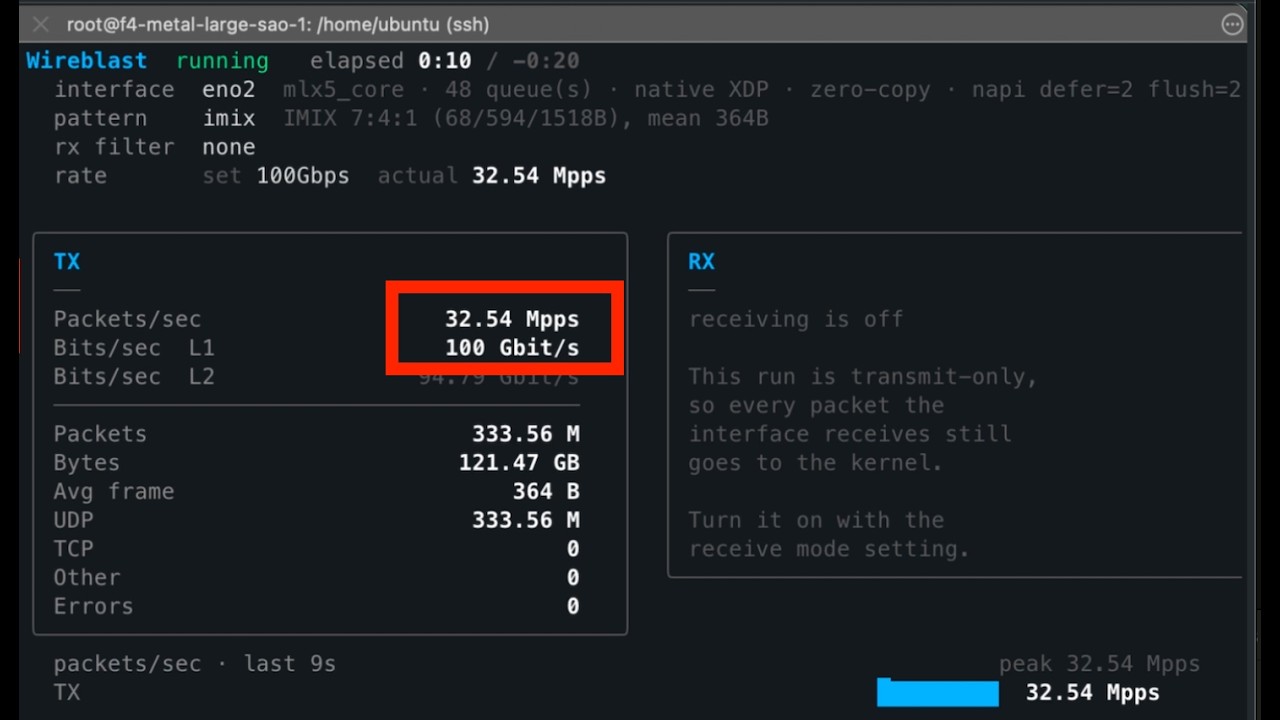
It puts real frames on a real NIC as fast as the hardware will take them, and tells you exactly what it sent. On a 100G Mellanox link it fills the pipe at every frame size, including 138 million packets a second of the smallest frames, from a single process. It is one static Go binary: no cgo, no libpcap, no DPDK, no kernel modules.
sudo wireblast
Run it with no arguments and a wizard walks you through picking an interface, a traffic pattern, and a rate. Thirty seconds later you have numbers.
Check out the demo video below.
The full documentation lives at wireblast.mintlify.site. This README is a quick start; the docs cover everything in depth:
- Quickstart and a no-NIC-needed veth lab
- Traffic patterns: UDP, TCP SYN, IMIX, raw Ethernet, PCAP replay
- Transmit vs receive, the safety model, and why it is transmit-only by default
- Reading the numbers: L1 vs L2 bit rates, and why your monitoring tool disagrees
- Performance: measured 100G results
- Common tasks and the FAQ
Wireblast is a single static binary. Download the latest release:
| Platform | Architecture | Download |
|---|---|---|
| Linux | x86-64 / amd64 | wireblast_linux_amd64.tar.gz |
| Linux | arm64 / aarch64 | wireblast_linux_arm64.tar.gz |
Checksums are published alongside each release as checksums.txt.
curl -L https://github.com/atoonk/wireblast/releases/latest/download/wireblast_linux_amd64.tar.gz \
  -o wireblast.tar.gz
tar -xzf wireblast.tar.gz
sudo install -m 0755 wireblast /usr/local/bin/wireblast
wireblast --version
Those URLs always resolve to the newest release, so you can script against them.
Or install with Go 1.25+:
go install github.com/atoonk/wireblast/cmd/wireblast@latestThe arm64 build runs on modern 64-bit Raspberry Pis (Pi 4, Pi 5, Zero 2 W and newer, on a 64-bit OS). Note that a Pi's onboard NIC has no native XDP, so Wireblast falls back to generic mode there: it works, but not at line rate.
See Install for requirements, the setcap alternative to sudo, and the locked-memory setting that catches first runs.
The wizard is the easy path, but everything it sets is also a flag:
# Interactive wizard
sudo wireblast

# Or specify it all and watch the live dashboard
sudo wireblast -i eth1 --dst-ip 192.0.2.10 --packet-size 512 --pps 1M -d 30s

# Scriptable: no wizard, no dashboard, plain text out
sudo wireblast --no-tui -i eth1 --dst-ip 192.0.2.10 --pps 1M -d 30s -y
No spare interface? A veth pair gives you a sender and a receiver on one machine, with nothing touching your real network:
sudo ip netns add wblab
sudo ip link add wb0 type veth peer name wb1
sudo ip link set wb1 netns wblab
sudo ip addr add 10.99.0.1/24 dev wb0 && sudo ip link set wb0 up
sudo ip netns exec wblab ip addr add 10.99.0.2/24 dev wb1
sudo ip netns exec wblab ip link set wb1 up

sudo wireblast -i wb0 --dst-ip 10.99.0.2 --packet-size 512 --pps 100k -d 10s
The namespace lab guide builds this out into a full sender and receiver.
The examples/ directory has 20 runnable examples, simplest to most advanced, each with a short README and a shell script driven by environment variables:
cd examples/010-imix
IFACE=eth1 DST=192.0.2.10 ./run.sh
They cover benchmarking a link, IMIX, PCAP replay, flow hashing, VLAN tagging, receiving, and running unattended.
On a Mellanox/NVIDIA ConnectX card Wireblast can bypass AF_XDP entirely and talk to the hardware through mlx5 Direct Verbs. It is several times cheaper per packet, because it skips the kernel's transmit path and drives the send queues from userspace:
| 100G at 68-byte frames | cores | |
|---|---|---|
| AF_XDP | 139.8 Mpps | 41.0 |
| Direct Verbs | 141.4 Mpps | 4.0 |
Both reach line rate. One does it on four cores.
It needs cgo and rdma-core, so it is behind a build tag — the ordinary binary stays a single static file that runs anywhere:
go build -tags mlx5 -o wireblast ./cmd/wireblast
sudo modprobe ib_uverbs mlx5_ib     # if /dev/infiniband is empty
There is nothing to configure. --io defaults to auto, which picks Direct
Verbs when the card is a ConnectX, the binary has the backend, and the run only
transmits; anything that receives stays on AF_XDP, because receive filters are
XDP programs and a steering rule cannot express all of them. The queue count
and how many queues a worker drives are derived from the link speed and the
frame size, and the startup line says what was chosen and why:
started: eno2: 16 queue(s) over 4 worker(s), mlx5 Direct Verbs
         (ConnectX card, transmit only), sized for 100G at 68-byte frames
Measured on a ConnectX-6 Dx behind an EPYC 9275F, with no flags but
--packet-size:
| frame | line rate | workers chosen | achieved | cores |
|---|---|---|---|---|
| 68 B | 142.0 Mpps | 4 | 141.4 Mpps | 3.98 |
| 128 B | 84.5 Mpps | 3 | 83.9 Mpps | 2.98 |
| 196 B | 57.9 Mpps | 4 | 58.3 Mpps | 3.98 |
| 256 B | 45.3 Mpps | 5 | 45.2 Mpps | 4.96 |
| 512 B | 23.5 Mpps | 3 | 23.5 Mpps | 2.98 |
| 1500 B | 8.2 Mpps | 1 | 8.2 Mpps | 1.00 |
The jump in cost between 196 and 256 bytes is the card's inline threshold: up to 192 bytes the packet is copied into the descriptor, above it the card fetches the packet itself, which costs a flat ~425 cycles however big it is.
--io afxdp forces the kernel path, --io mlx5 insists on Direct Verbs and
fails with a reason if it is unavailable, and --queues / --queues-per-worker
override the derived sizing.
Everything above is covered in depth in the docs; this section is for working on Wireblast itself.
go build -o wireblast ./cmd/wireblast        # local build
CGO_ENABLED=0 go build ./cmd/wireblast       # fully static, portable to any Linux of the same arch

go test ./...                                # no root, no hardware, no AF_XDP required
go vet ./... && gofmt -l .                   # what CI checks
Tests that need root and a real NIC live behind a build tag and are excluded from the normal run:
sudo go test -tags integration ./...The command is a thin shell; the work is in internal/:
| Package | Responsibility |
|---|---|
cmd/wireblast |
main, signal handling, version |
internal/cli |
Cobra command and flag parsing |
internal/config |
the single central config, validation, and unit helpers |
internal/discovery |
reads interfaces, addresses, routes, neighbours; resolves the next hop |
internal/packet |
builds Ethernet / 802.1Q / IPv4 / UDP / TCP frames with incremental checksums |
internal/generator |
turns a config into a stream of frames (flows, IMIX, raw, PCAP) |
internal/pcapfile |
pure-Go loader for Ethernet .pcap / .pcapng captures |
internal/rate |
the aggregate token-bucket rate limiter |
internal/dataplane |
packet I/O: AF_XDP sockets and the XDP filter, mlx5 Direct Verbs, backend choice, the run loop |
internal/stats |
atomic counters, rate snapshots, history |
internal/tui |
the interactive wizard and live dashboard (Bubble Tea) |
internal/prefs |
remembers your last run under ~/.wireblast/ |
internal/app |
wires a validated config into a running dataplane for --no-tui |
Releases are cut by tagging. Pushing a vX.Y.Z tag runs .github/workflows/release.yml, which tests and then runs GoReleaser (.goreleaser.yaml) to cross-compile, archive, checksum, and publish the GitHub Release. Asset filenames carry no version so the releases/latest/download/… URLs stay stable.
The AF_XDP machinery (UMEM, the four rings, XDP program loading, the zero-copy paths) lives in go-afxdp, a standalone Go library. Wireblast is the packet generator on top of it. If you want to build your own line-rate tool in Go, start there.
Apache-2.0. Built on go-afxdp.