


A CLI + IDE extensions for Flutter contributors and power users. Manage multiple Flutter SDK versions, automate contributor environment setup, and wrap the engine build/run/test cycle into simple commands.
Install from the VS Code Marketplace or search Flutter Compile in the Extensions panel.
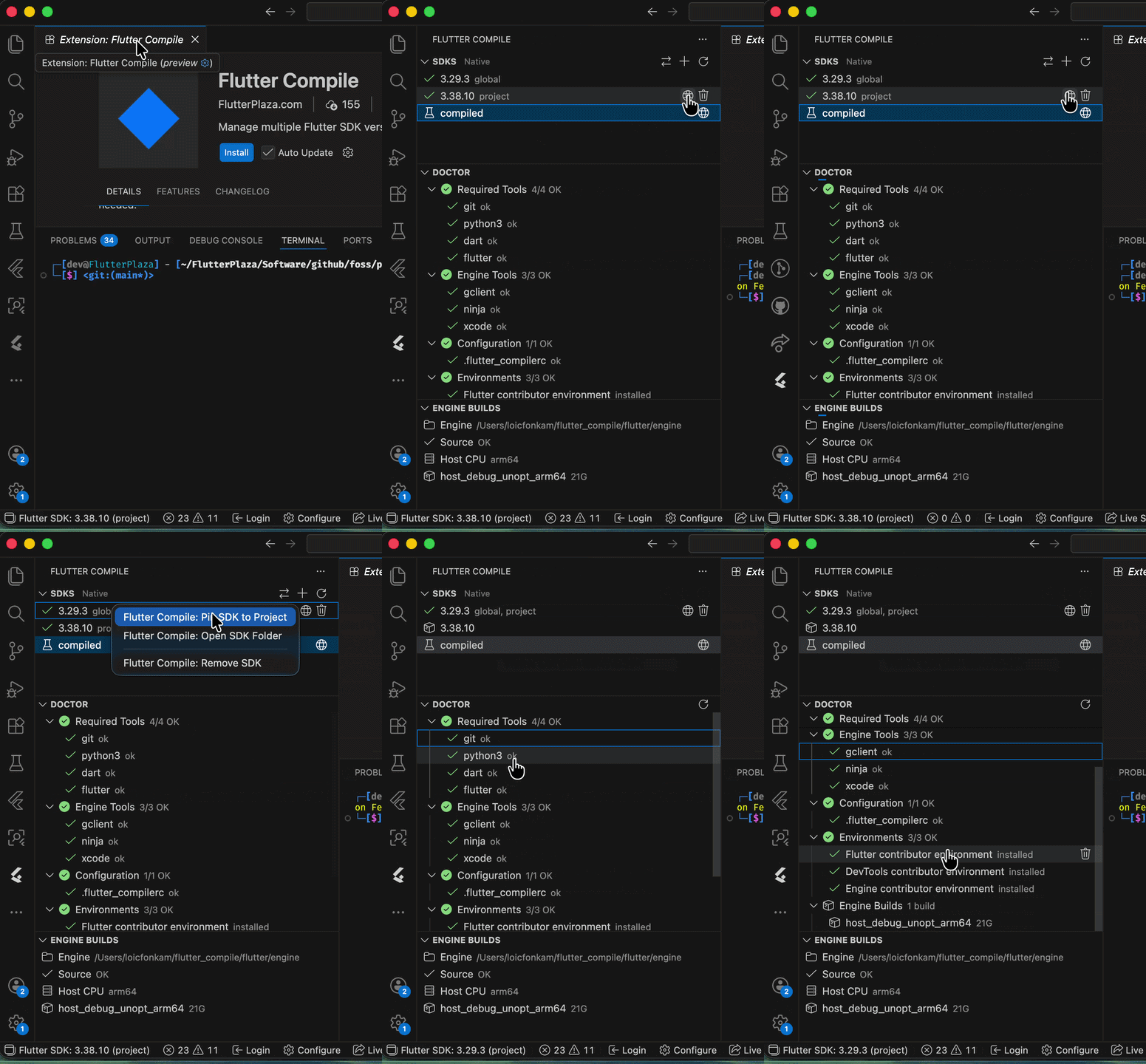
- Browse, install, switch, pin, and remove Flutter SDKs from the sidebar
- Toggle between Native and FVM SDK backends with one click
- Doctor diagnostics with install/fix actions for failing checks
- Engine Builds view for contributors compiling the Flutter engine
- Status bar with active SDK version — click to switch
- Auto-updates
dart.flutterSdkPathon SDK switch
See the full VS Code Extension README for details.
Install from the JetBrains Marketplace or search Flutter Compile in Settings > Plugins.
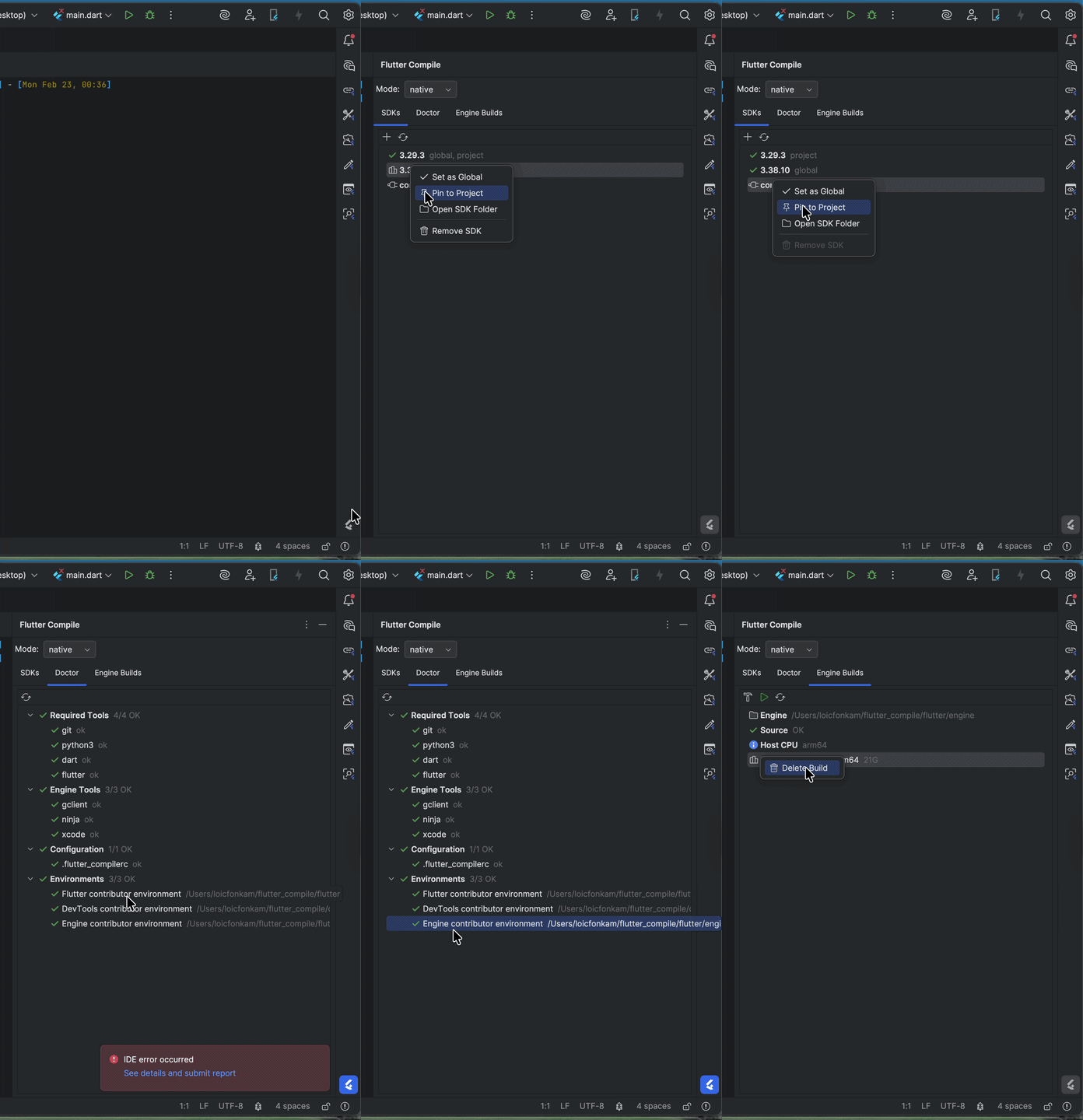
- Tool window with SDKs, Doctor, and Engine Builds tabs
- Mode dropdown to switch between Native and FVM backends
- Toolbar combo box for instant SDK switching
- Right-click context menu: Set Global, Pin to Project, Open Folder, Remove
- File watcher for
.flutter-versionchanges - Auto-updates Flutter SDK path in project settings
See the full IntelliJ Plugin README for details.
dart pub global activate flutter_compileBoth flutter_compile and the shorter fcp alias are available:
fcp sdk list          # same as flutter_compile sdk list
fcp doctor            # same as flutter_compile doctor
Requirements: macOS, Linux, or Windows; git, python3. On Windows, Visual Studio with C++ workload is required for engine builds.
| Command | Alias | Description |
|---|---|---|
sdk install <ver> |
Install a Flutter SDK by version or channel | |
sdk list |
sdk ls |
List installed SDKs with global/project markers |
sdk global [ver] |
Set or show the global default SDK | |
sdk use [ver] |
Pin or show per-project SDK (.flutter-version) |
|
sdk exec <cmd> |
Run a command through the resolved SDK | |
sdk remove <ver> |
Delete an installed SDK | |
install flutter |
i flutter |
Set up Flutter contributor environment |
install engine |
i engine |
Set up engine build environment (requires install flutter first) |
install devtools |
i devtools |
Set up DevTools contributor environment |
uninstall <env> |
delete |
Remove a contributor environment |
sync |
sy |
Sync all contributor environments with upstream |
build engine |
b engine |
Compile the Flutter engine (GN + ninja) |
run |
r |
Run a Flutter app with a locally-built engine |
test |
t |
Run tests with a locally-built engine |
clean |
c |
List or delete engine build outputs |
status |
st |
Show engine configuration and builds |
config |
cf |
Read/write ~/.flutter_compilerc settings |
doctor |
dr |
Health-check tools, config, and environments |
daemon |
JSON-RPC 2.0 server for IDE communication | |
ui |
Interactive terminal UI dashboard | |
update |
up |
Self-update to latest pub version |
Install and manage multiple Flutter SDK versions side-by-side. Each SDK gets its own isolated PUB_CACHE.
fcp sdk install 3.24.0          # specific version
fcp sdk install stable           # channel
fcp sdk global 3.24.0            # set global default
fcp sdk use 3.24.0               # pin to current project
fcp sdk exec flutter doctor      # run through resolved SDK
fcp sdk remove 3.19.0            # delete an SDK
Resolution order for sdk exec: project .flutter-version first, then global default.
One-command setup for Flutter framework, DevTools, and engine contributor environments.
fcp install flutter              # clone flutter/flutter, set up remotes
fcp install engine               # depot_tools + gclient sync (requires install flutter first)
fcp install engine --force       # force gclient sync for dirty repos
fcp install devtools             # clone flutter/devtools, configure PATH
fcp sync                         # sync all environments with upstream
fcp sync engine --force # force sync with --resetfcp build engine # host, debug, unoptimized
fcp build engine -p android -m release # android release
fcp run # run app with local engine
fcp test # test with local engine
fcp clean # list builds with sizes
fcp status # engine config overviewShip Dart-only fixes to your Flutter app between store releases. Signed patches, staged rollouts, and one-tap rollbacks — all driven from the CLI.
Code push updates your app's Dart code at runtime through a virtual-machine-based update mechanism. Your app's native code, resources, and permissions are never modified — the app itself is only ever updated through the store.
Store policies govern this kind of mechanism, and you are the developer of record for your app. Review Google Play's Device and Network Abuse policy and App Store Review Guideline 3.3.2, and make your own distribution decision. Distribution channels outside the app stores (enterprise/MDM, alternative stores, direct APK) are outside the scope of these store policies (your own regulatory, enterprise, or contractual obligations still apply).
If you want over-the-air updates disabled specifically for Play Store installs, set disableOnPlayStoreInstalls: true when initializing the SDK (available from flutterplaza_code_push 0.1.12; earlier versions do not support this option) — the app then updates only through the store on Play-installed devices, while other channels keep code push.
fcp codepush setup                         # one-time toolchain setup
fcp codepush init                          # generate native integration files + signing key
fcp codepush login                         # browser-based OAuth
fcp codepush release --build               # build and upload a baseline release
fcp codepush patch --build --rollout 25    # ship a signed patch at 25% rollout
fcp codepush rollback --patch-id <id>      # roll a patch back
Full documentation: codepush.flutterplaza.com/docs — runtime SDK integration, signing key management, channel-based rollouts, admin console, and the runtime Flutter plugin (flutterplaza_code_push). See the pricing page for plan limits.
fcp daemon     # JSON-RPC 2.0 server for IDE extensions (stdin/stdout)
fcp ui         # interactive terminal dashboard (SDKs, Doctor, Builds)
The daemon supports sdk.list, sdk.global.get/set, doctor, config.*, status, and sdk.changed/config.changed notifications.
fcp sdk list --json
fcp doctor --json
fcp config list --json
fcp status --jsonfcp completion install # install tab completions for your shell
fcp completion uninstall # remove completionsdart test