EasyAF is CloudNimble's platform for warp-speed application development with .NET, powered by EDMX.
EasyAF.EntityDesigner is a modern evolution of Microsoft's original EDMX experience that works with EF 6.5 and SDK-style projects targeting .NET Framework AND .NET 8+.
We've stripped it down and removed all the legacy code, dependencies, and ugly WinForms UI that bogged it down.
It's now refreshed with a lighter codebase, modern UI enhanced by WPF, and a bevy of new features.


| Feature Supported | Microsoft EF6Tools | EasyAF Entity Designer |
|---|---|---|
| .NET Framework 4.8+ | ✅ | ✅ |
| .NET 8 / 9 / 10 / 11 | ❌ | ✅ |
| Entity Framework v1-5 Support | ✅ | ❌ |
Microsoft.Data.SqlClient Support |
❌ | ✅ |
| SDK-Style Projects | ❌ | ✅ |
| Intuitive User Experience | ❌ | ✅ |
| High-Res Image Export | ❌ | ✅ |
| SVG Export | ❌ | ✅ |
| Mermaid Diagram Export | ❌ | ✅ |
| Headless Rendering (No VS Needed) | ❌ | ✅ |
dotnet Global Tool CLI |
❌ | ✅ |
| Modern (MSAGL) Layout Engine | ❌ | ✅ |
The Age of AI makes it easy to keep just about anything up-to-date. We recently took the time to make some minor improvements to Microsoft's still-shipping EF6Tools codebase, and were rejected.
The thing is, EDMX is still a very powerful language for describing a database schema. We use it to power data access and code generation in both EF6 and EFCore applications across multiple cloud providers.
In fact, Entity Framework 6.5 runs great on modern .NET, It's a valid compatibility path to get legacy apps onto .NET 8+, and there are thousands of EDMX-based applications still being maintained.
We don't need something new here. We just need something that works.
Handing an AI your database schema usually means one of two bad trades: thousands of tokens of EDMX XML, most of it namespace declarations and designer coordinates, or raw T-SQL that describes tables but not the conceptual model you actually think in.
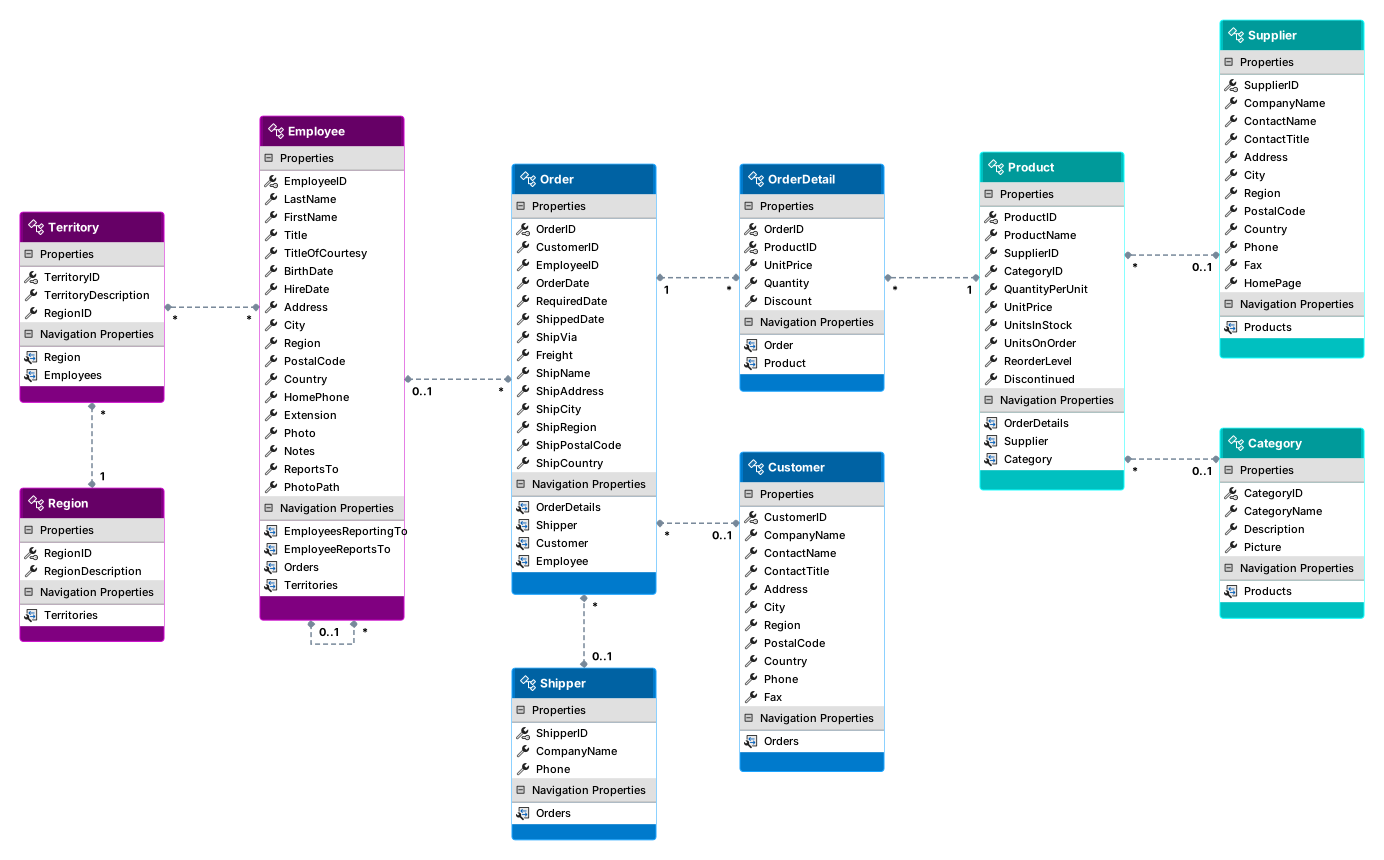
dotnet edmx gives you a third option. Because the designer no longer needs a Visual Studio shell, the same engine that draws your diagrams can run from a terminal, a build script, or an agent — and emit your model as Mermaid, which is compact, readable, and already understood by every major model.
dotnet tool install --global EasyAF.Edmx.DiagramToolsThe tool is Windows-only and requires the .NET 10 runtime. Update or remove it with:
dotnet tool update --global EasyAF.Edmx.DiagramTools
dotnet tool uninstall --global EasyAF.Edmx.DiagramToolsRenders the diagrams in an EDMX file to SVG, a raster image, or Mermaid.
edmx render [options] <Input>| Argument / Option | Description |
|---|---|
<Input> |
Path to the .edmx file to render. |
-d|--diagram |
Name of the diagram to render. Defaults to the first one in the file. |
-f|--format |
svg, png, jpg, bmp, gif, tiff or mermaid. Inferred from --output when omitted. |
-o|--output |
File to write. Defaults to the input name with the format's extension. |
--show-types |
Show property data types alongside property names. |
--transparent |
Render with a transparent background. SVG and raster only. |
Give an agent the conceptual model instead of the file:
edmx render Northwind.edmx -f mermaid -o Northwind.mmderDiagram
Order ||--o{ OrderDetail : FK_Order_Details_Orders
Shipper |o--o{ Order : FK_Orders_Shippers
Employee |o--o{ Employee : FK_Employees_Employees
Employee }o--o{ Territory : EmployeeTerritories
Entities, cardinality, relationship names, self-references and many-to-many joins — in a few dozen tokens rather than a few thousand.
Include column data types when the agent needs them:
edmx render Northwind.edmx -f mermaid --show-typesProduce a diagram for docs or a pull request:
edmx render Northwind.edmx -o docs/schema.svg --transparent- New "Dark Mode" rendering style
- More control over SVG outputs
- Better integration with EasyAF tooling
- Additional CLI commands beyond
render - Richer Mermaid output, including entity attributes
- Better leverage C# 14 language features
- Improve test coverage