Documentation · Quick start · Demos · Performance · Support matrix · 简体中文


EmbodiRun is a deployment and execution runtime for embodied AI. Describe your devices, inference services, and compute nodes in YAML, then run the observation–inference–action loop through a shared runtime. Keep control beside the robot and place inference on a GPU host, or run both on one machine.
Use EmbodiInfer as the inference engine, connect an external model service, or bring an agent with its own planning loop.
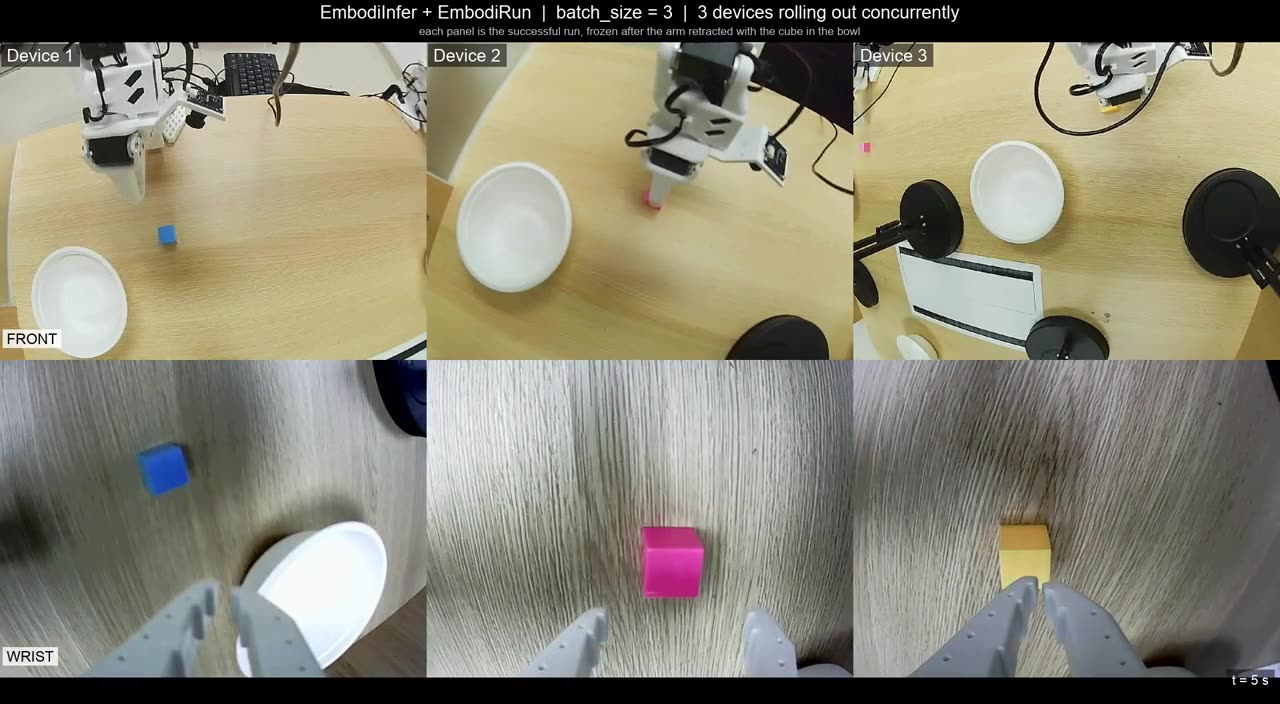
| Three robots, one inference service | Comparing inference engines on SO-101 |
|---|---|
 |
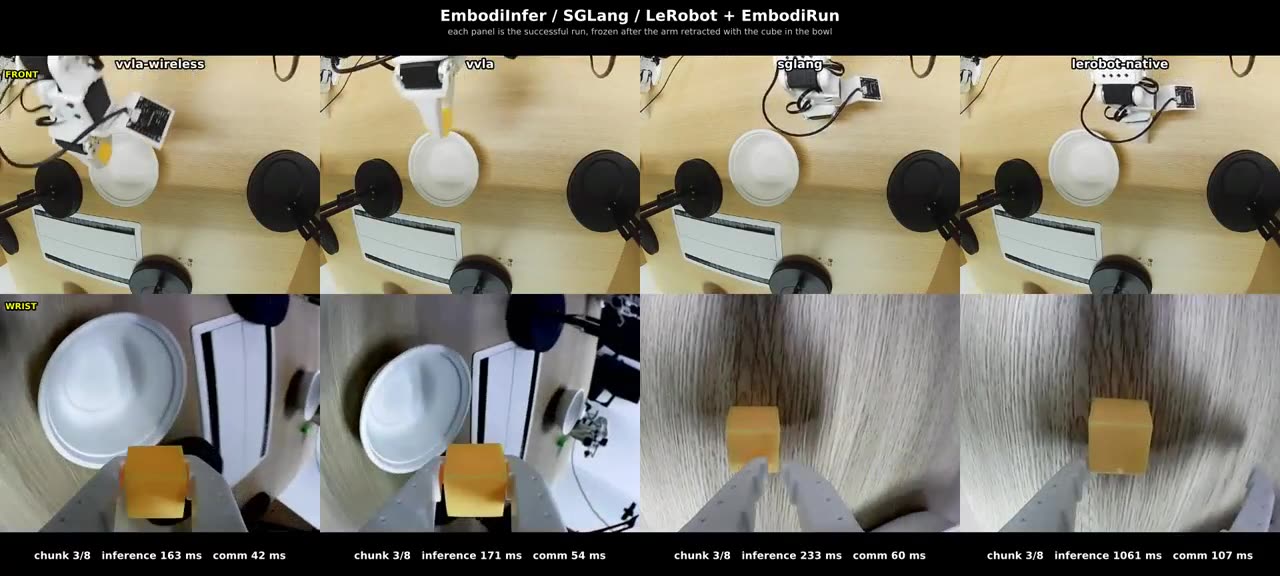 |
| Three SO-101 arms using a shared π0.5 inference service, with one rollout process per device. | π0.5 on a Jetson AGX Thor with an SO-101 arm: EmbodiInfer over HTTP and WirelessComm, SGLang, and native LeRobot. |
Click a preview to watch the video and explore its setup and measurements.
Build a complete task: the experimental XLeRobot snack-delivery recipe connects recorded base routes, π0.5 grasp proposals, and operator-confirmed handover.
Keep control close to the robot. Share compute where it counts.
|
Place robot control on the edge and inference on a GPU host. One YAML describes the nodes, environments, devices, and bindings; the Host CLI handles preparation and service lifecycle. Deployment architecture → |
Connect independent device loops to a shared model endpoint. Each robot keeps its own session and execution flow while using the same inference service. See three SO-101 arms in action → |
|
Choose HTTP or WirelessComm for inference without changing the model-facing observation and action contract. Session and step semantics stay consistent across transports. Transport design and measurements → |
Shared camera and state snapshots feed inference, agent observations, and recording. The runtime owns device connections, so each consumer does not need to open the hardware again. Device and observation ownership → |
|
Observe, request policy proposals, execute actions, inspect jobs, and cancel through a dependency-free Python client. Bring your own planning loop; reuse the runtime underneath. Agent client → |
Action validation, execution arbitration, and manual takeover sit between policy output and hardware. Robot adapters and policy bindings keep motion details out of application code. Execution controls and hardware setup → |

Host prepares and launches the deployment. Control owns robot connections, observations, and action execution; Simulation serves simulator environments. Inference turns observations into predictions. These services can run on separate machines. See Architecture for the full design.
On a Jetson AGX Thor, the recorded comparison reduced median inference latency from 1,061 ms to 162 ms and the complete control-loop chunk from 3,592 ms to 2,660 ms. Faster inference shortens the loop; action playback still accounts for about 2.45 seconds per chunk.
| Engine | Transport | Inference latency | Full chunk time |
|---|---|---|---|
| EmbodiInfer | WirelessComm | 162 ms | 2,660 ms |
| EmbodiInfer | HTTP | 170 ms | 2,666 ms |
| SGLang | HTTP | 194 ms | 2,713 ms |
| Native LeRobot | HTTP | 1,061 ms | 3,592 ms |
Medians over 15 chunks per run, with the same SO-101 checkpoint, 10 denoising steps, two cameras, and 50-step action chunks at 20 Hz. EmbodiInfer uses its optimized path, SGLang uses upstream defaults, and LeRobot uses eager execution. The demo report describes the hardware, engine settings, and timing breakdown.
For transport measurements, see the HTTP/WirelessComm experiment. For model-only benchmarks, see EmbodiInfer.
Install from source with Python 3.10+ and uv 0.12.x:
git clone https://github.com/BUAA-CI-LAB/EmbodiRun.git
cd EmbodiRun
uv sync --frozen
Try the local simulated-device walkthrough:
uv run python examples/run_shared_device_fake.pyIt starts a local Control service with simulated joints and a fake camera, exercises observation, execution, recording, and cancellation, and shuts the service down. No robot, model checkpoint, or GPU is required.
Continue with Quick start to use the deployment CLI. For hardware, choose a combination from the support matrix, configure its devices and calibration, and read Safety before execution.
✓ Software-tested · ◐ Experimental · ○ Planned
| 🧪 Simulators | 🦾 Robots | 🧠 Models |
|---|---|---|
|
✓ LIBERO ◐ VLABench |
✓ SO-101 · real-robot demos ◐ ARX5 |
✓ π0.5 ◐ DM0.5 · ARX5 binding |
These are EmbodiRun integration statuses. Choose a model–device pairing in the deployment recipes. For an experimental MuJoCo navigation workflow, see the MicroDuck VLN recipe. For the inference engine's broader model catalog, see EmbodiInfer.
Bring your own application: use the Python client, the experimental RPent adapter, or connect an external inference service.
- 🦾 AgileX PiperX — robot adapter and policy binding.
- 🧠 SmolVLA — inference adapter and deployment integration.
- 🧠 OpenVLA — base-model support, separate from the existing OpenVLA-OFT inference adapter.
- 🧪 More simulators — next targets to be selected.
Implementation steps and integration ownership are tracked in the roadmap.
| Task | Guide |
|---|---|
| Install and run | Installation · Quick start |
| Configure a deployment | Configuration |
| Operate devices | Control · Safety |
| Extend the runtime | Architecture · Python API |
| Review evidence | Support matrix · Experiments |
See CONTRIBUTING.md for development setup and checks. Use GitHub issues for bugs and feature requests, and follow SECURITY.md for private vulnerability reports. Community participation follows our Code of Conduct.
Apache-2.0. See LICENSE, NOTICE, and third-party notices. Model weights, datasets, robot SDKs, and simulators retain their own licenses.