English · فارسی (Persian)

Temporal Browser Intelligence Engine + Agent-Owned Workflow Runtime
350 Certified MCP Tools • Sub-Millisecond Time-Travel DOM • Manifest V3 Chrome Extension • Zero-Dependency Python SDK








Jump to section
- What is TeleDOM?
- Why use it?
- Visual Demo & Architecture Preview
- Feature Highlights
- Tech Stack
- Quick Start
- Token-Efficient Operating Profiles
- How it Works
- Agent-Owned Workflows & Target Memory
- The 350 Certified MCP Tools Surface
- Dedicated Universal CLI (
dom-antigravity) - Python SDK Reference
- Settings & Environment Variables
- Session vs Persistent Data
- Supported Environments & Compatibility
- System Requirements
- Development & Building from Source
- Running Tests & Quality Verification
- Project Structure
- Troubleshooting
- Honest Limitations
- Security & Privacy Model
- FAQ
- Documentation Index
- Contributing & Security
- License & Author
TeleDOM is an enterprise-grade Temporal Browser Intelligence Engine and Model Context Protocol (MCP) platform providing 350 certified tools for autonomous AI coding agents (Claude, Cursor, Antigravity, Cline, OpenAI Swarm) and frontend engineering teams.
Instead of running inside an artificial, headless sandbox, TeleDOM connects directly to a live Chromium browser via a hardened Manifest V3 extension. It continuously records DOM mutations, user actions, network events, and layout shifts with nanosecond precision:
- Temporal EventMesh: Hash-chained, tamper-evident event log with nanosecond timestamps, vector clocks, and causality links.
- Sub-Millisecond DOM Time-Travel: Reconstructs the exact virtual DOM state at any point in time ($State(T)$) for diffing and regression analysis.
- Agent-Owned Workflows (TeleDOM Flow): AI agents teach tasks once, persist them as parameterized programs, and rerun them with up to 80% fewer round trips and 50% fewer DOM scans.
- Real User Context: Runs against real user sessions, active logins, cookies, and extensions without brittle login re-authentication.
Name meaning: Tele (remote observation and telemetry across system boundaries) + DOM (Document Object Model). TeleDOM bridges AI agents to the live temporal state of any webpage.
Note
TeleDOM runs 100% locally on your machine. No cloud telemetry, no remote analytics, and zero external network calls during normal operation.
| Problem in Existing Solutions | TeleDOM Solution |
|---|---|
| Headless blank sandbox: Conventional Puppeteer/Playwright instances lack user logins, cookies, and saved sessions | Real Chrome session: Connects directly to the user's active browser profile with full extension and auth state |
| Brittle scrapers & agents: AI agents re-explore pages from scratch on every run, wasting time and tokens | Agent-Owned Workflows & Target Memory: Persists discovered elements and multi-step flows for instant verbatim replay |
| Token context bloat: Dumping 50k+ lines of raw HTML quickly exhausts the LLM's context window |
4 Token-Efficient Profiles: Scales schema exposure from ~2,400 tokens (minimal) up to full enterprise (full) |
| Ephemeral errors: Transient DOM bugs, layout shifts, and race conditions disappear after page reloads | Sub-millisecond Time-Travel ($State(T)$): Deterministic snapshot interpolation at any historical timestamp |
| Hallucinated assertions: AI tools often assume actions succeeded without proof | Formal Invariants & Proof Engine: Mathematical verification of DOM structural equivalence and zero false positives |
| Manual DevTools debugging: Engineers spend hours sifting through network waterfalls and console logs |
Autonomous Root-Cause Investigator (td_investigate): Generates hypothesis graphs and portable .tdom bundles |
| Chrome MV3 30s timeouts: Manifest V3 service workers get terminated by Chrome during long agent tasks | 24s Alarm Heartbeat: Self-healing keep-alive pulse + DevTools (F12) CDP collision protection |
| Dangerous automated mutations: Blind AI clicks can trigger unintended state modifications or deletions | Safe Mutation Engine: Atomic transactional dry-runs with guaranteed zero-cost rollbacks |
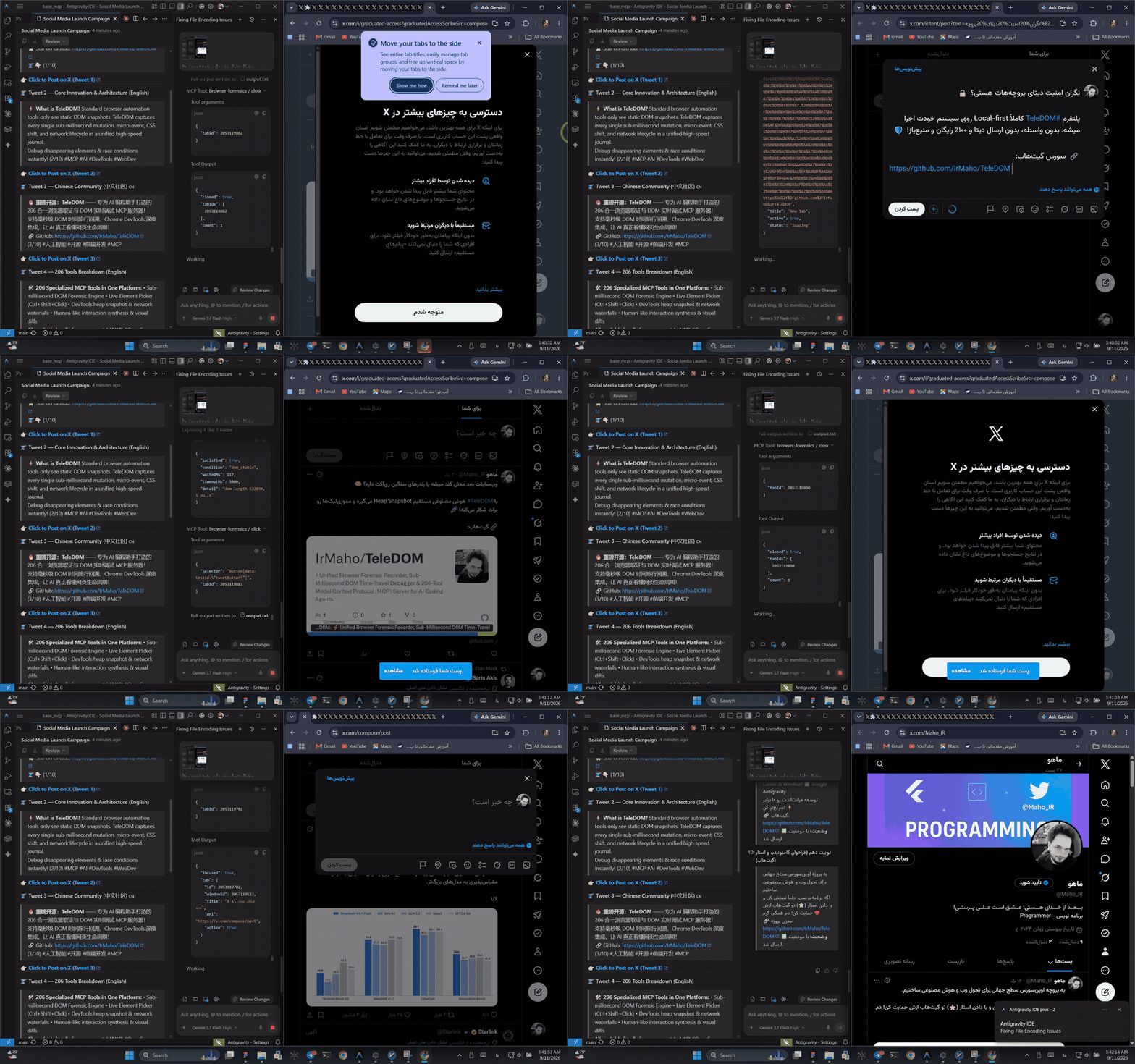
🎬 Live Automation Demo: Autonomous AI agent driving real-time browser forensic recording, live DOM inspection, synthetic actions, and multi-turn workflows. (Watch Full 1080p Video)
+-------------------------------------------------------------------------+
|                          AI AGENT / CLIENT                              |
|           (Antigravity IDE · Cursor · Claude Desktop · Cline)           |
+------------------------------------+------------------------------------+
                                     | (JSON-RPC 2.0 over stdio)
                                     v
+-------------------------------------------------------------------------+
|                  TELEDOM V4.1 MCP SERVER (350 TOOLS)                    |
|  ├── 144 td_* Temporal Intelligence & Workflow Runtime Tools            |
|  ├── 54 dt_* Chrome DevTools Fusion Tools                               |
|  ├── 31 fx_* Advanced Visual & Forensic Tools                           |
|  ├── 121 Core & Live Interaction Tools                                  |
|  └── Zero-Config On-Demand Auto-Bridge Dispatcher (:3847)               |
+------------------+------------------------------------+-----------------+
                   |                                    | (WebSocket :3847)
                   v                                    v
+------------------------------------+  +---------------------------------+
|      WORKFLOW RUNTIME ENGINE       |  |   CHROME EXTENSION (MV3)        |
|  ├── Workflow Persistence & Diff   |  |  ├── MutationObserver Engine    |
|  ├── Target Memory Fingerprints    |  |  ├── Ctrl+Shift+Click Picker    |
|  ├── EventMesh & Causal Graph      |  |  ├── Canvas Screenshot Pipeline |
|  └── Verification & Formal Proofs  |  |  └── Synthetic Action Driver    |
+------------------------------------+  +---------------------------------+
| Operating Surface | Primary Purpose |
|---|---|
MCP Server (stdio) |
Exposes 350 certified tools to any Model Context Protocol-compatible AI agent |
CLI (dom-antigravity) |
One-click workspace installation, status diagnostics, clean screenshots, bridge daemon |
| Chrome Extension (MV3) | Captures mutations, coordinates element picking, executes synthetic clicks/types |
Python SDK (teledom) |
Zero-dependency Python 3.9+ library for programmatic, semantic browser automation |
-
Agent-Owned Workflow Runtime: Build, parameterize, version, diff, and execute complex multi-step web programs (
td_workflow_run). - Target Memory & Fingerprinting: Persists discovered DOM selectors and signatures to eliminate repetitive element searches.
- Nanosecond Temporal EventMesh: Tamper-evident hash-chained event log with vector clocks, causality chains, and Merkle root verification.
-
Sub-Millisecond DOM Time-Travel: Instant reconstruction of exact virtual DOM state at any past timestamp
$T$ ($State(T)$). - Counterfactual Browser Simulation: Branch virtual DOM executions, suppress mutations or network requests, and compare alternative outcomes.
-
Autonomous Incident Investigator: Single-command triage (
td_investigate), multi-stage hypothesis generation, and portable.tdombundles. - Safe Mutation Engine: Transactional DOM modifications with immutable diffs, side-effect-free dry runs, and guaranteed rollbacks.
- Passive Security Intelligence: Zero-trust page scanning, prompt-injection defense, runtime XSS detection, and automatic credential sanitization.
- 4 Configurable Runtime Profiles: Scale from ultra-lean 22 tools (~2,400 tokens) to the complete 350-tool enterprise suite.
- Zero-Dependency Python SDK: Native Python 3.9+ interface with context managers for high-level browser control.
- Universal Stdio JSON-RPC 2.0 Certification: 350/350 tools fully certified against real operational test schemas.
| Layer | Technology | Purpose |
|---|---|---|
| Core Runtime | Node.js 22+ & TypeScript 5.8+ | Non-blocking async MCP server, EventMesh, and storage engine |
| Agent Protocol | Model Context Protocol (MCP) | Universal JSON-RPC 2.0 interface for AI coding agents |
| Browser Extension | Chrome Extension Manifest V3 | MutationObserver, WeakMap element binding, Canvas cropping |
| Browser Integration | Chrome DevTools Protocol (CDP) | Direct DevTools inspection, Lighthouse audits, network HAR |
| Python SDK | Pure Python 3.9+ (Zero Dependencies) | High-level Browser and Workflow semantic client |
| Testing & QA | Vitest 3.x, Ruff, Mypy | Unit tests, Python typing, and operational stdio certification |
| Platforms | Windows 10/11, macOS, Linux | Cross-platform desktop and CI execution support |
Install the global CLI and configure your agent workspace:
# 1. Install CLI globally
npm install -g teledom

# 2. Configure TeleDOM for your current workspace (.agents)
dom-antigravity install --workspace

# Or register globally for all projects in Antigravity IDE:
dom-antigravity install --globalgit clone https://github.com/IrMaho/TeleDOM.git
cd TeleDOM
npm install
npm run build
npm run test:unitpip install ./sdk/pythonfrom teledom import Browser
with Browser() as browser:
browser.inspect()
browser.type("#search-box", "Autonomous Coding Agents")
browser.click("#submit-btn")- Load the unpacked Chrome extension from
teledom/dist/extensioninchrome://extensions/. - Connect your AI agent (Antigravity IDE, Cursor, Claude Desktop) via MCP.
- The server automatically spawns the WebSocket bridge on port
3847on demand. - Let the agent inspect the page and record a workflow:
{"name": "td_workflow_save", "arguments": {"name": "login_flow", "steps": [...]}} - Replay the workflow anytime with single-call deterministic precision:
{"name": "td_workflow_run", "arguments": {"workflow_id": "login_flow"}}
To eliminate context window bloat and reduce token expenses by up to 94%, TeleDOM introduces 4 runtime profiles via the TELEDOM_PROFILE environment variable:
| Profile | Exposed Tools | Approx. Schema Tokens | Best For | Description |
|---|---|---|---|---|
minimal |
22 | ~2,400 tokens | Budget LLMs & fast agent tasks | Core browsing: navigate, click, type, inspect, screenshot |
core |
42 | ~4,800 tokens | Autonomous navigation & workflows | Core actions + target memory + workflow runtime |
forensics |
74 | ~8,500 tokens | QA debugging, audits & triage | Visual regressions, DOM diffs, network & console logs |
full (default) |
350 | ~40,000 tokens | Deep reasoning & enterprise suites | Complete 350-tool surface with full backward compatibility |
# Launch MCP server with the ultra-lean core profile
TELEDOM_PROFILE=core npx teledomflowchart LR
A["AI Agent / LLM"] -->|"JSON-RPC 2.0 / stdio"| B["ForensicMCPServer"]
B -->|"Auto-Bridge (Port 3847)"| C["Chrome MV3 Extension"]
C -->|"MutationObserver"| D["Target Webpage"]
D -->|"Nanosecond Events"| E["Temporal EventMesh"]
E -->|"Time-Travel Snapshot"| F["Virtual DOM State(T)"]
F -->|"Deterministic Replay"| G["Mathematical Proof & Verification"]
flowchart TB
    subgraph AgentLayer["Agent Layer"]
        IDE["Antigravity IDE / Cursor / Claude"]
        PY["Python SDK teledom"]
        CLI["Universal CLI dom-antigravity"]
    end

    subgraph ServerLayer["TeleDOM MCP Runtime (Node.js)"]
        MCP["ForensicMCPServer (350 Tools)"]
        WF["Workflow Runtime Engine"]
        TM["Target Memory Store"]
        EM["Temporal EventMesh Kernel"]
        CE["Causal & Incident Investigator"]
        AB["Zero-Config Auto-Bridge"]
    end

    subgraph BrowserLayer["Browser Runtime (Chrome MV3)"]
        CS["Content Script & WeakMap NodeId"]
        MO["MutationObserver Engine"]
        EV["Synthetic Action Dispatcher"]
        SC["Canvas Screenshot Pipeline"]
    end

    IDE --> MCP
    PY --> MCP
    CLI --> AB
    MCP --> WF
    MCP --> TM
    MCP --> EM
    MCP --> CE
    MCP --> AB
    AB <-->|"WebSocket Frames (Port 3847)"| CS
    CS --> MO
    CS --> EV
    CS --> SC
TeleDOM v4.1 shifts browser automation from fragile, manual scripting to agent-authored reusable programs:
RUN #1 (Explore)   5 tool calls · 2 DOM scans · 5 MCP round trips
  → Agent learns: saves learned targets + writes the workflow

RUN #2 (Reuse)     1 td_workflow_run call · 1 DOM scan
  ✔ verify_cta  ✔ click_cta  ✔ extract  ✔ assert   → SUCCESS
  Deterministic execution record + verbatim replay

KPIs: 80% fewer MCP round trips · 50% fewer DOM scans · replay PASS
      0 unsafe-action bypass · 0 workflow corruption · 350/350 certified
| Family | Count | Tools Included |
|---|---|---|
| Browser Primitives | 22 | td_browser_*, td_dom_*, td_target_*, td_action_*, td_wait, td_screenshot, td_execute_script, td_network_inspect, td_console_read |
| Workflow Runtime | 14 | td_workflow_save/get/list/update/delete/clone/diff/export/import/validate/run/runs/run_get/replay |
| Agent-Owned Tooling | 8 | td_target_memory_* (persistent targets), td_agent_artifact_* (custom tools & policies) |
TeleDOM provides the most comprehensive browser toolset available for AI agents, certified 100% against operational schemas:
| Family | Prefix | Tool Count | Primary Responsibilities |
|---|---|---|---|
| Temporal Intelligence & Workflows | td_* |
144 | EventMesh, Causal analysis, Evidence Graph, Counterfactuals, Workflow runtime, Target memory, Proofs, Security |
| Chrome DevTools Fusion | dt_* |
54 | Direct DevTools inspection, Lighthouse audits, HeapSnapshots, Network HAR, Console logs, Emulation |
| Advanced Forensic Capabilities | fx_* |
31 | Network-DOM correlation, Visual regression, Layout shifts, Z-index occlusion, Safe mutation guards |
| Core & Live Interaction | Core / v3 | 121 | Live element picking, screenshot cropping, synthetic actions, DOM diffing, time-travel, lifecycle traces |
| Total Certified Tools | 350 | 100% Operational Stdio Certification (350/350 PASS) |
Complete parameter schemas and operational examples:
Registered binary with aliases mcp-dom and browser-antigravity:
| Command | Option / Alias | Description |
|---|---|---|
dom-antigravity install |
--workspace (-w) |
Configure TeleDOM in current workspace (.agents/mcp_config.json) |
dom-antigravity install |
--global (-g) |
Configure TeleDOM globally for all projects in Antigravity IDE |
dom-antigravity install |
--target <dir> |
Install MCP config into a specific directory |
dom-antigravity status |
Check bridge server health (:3847) and connected Chrome tabs |
|
dom-antigravity screenshot |
Capture pristine live full-page & element screenshots to disk | |
dom-antigravity bridge |
Start WebSocket bridge manually (optional — Auto-Bridge handles this) | |
dom-antigravity config |
cursor / claude |
Print ready-to-use JSON configuration blocks |
Zero-dependency Python package (sdk/python/teledom):
from teledom import Browser, Workflow

with Browser() as browser:
    # 1. High-level browser control
    page = browser.inspect()
    browser.type("#search-box", "Autonomous Agents")
    browser.click("#submit-btn")

    # 2. Build and persist a workflow
    wf = Workflow("triage_issues", client=browser.client)
    wf.input("filter", "Issue label filter", default="bug")
    wf.step("check_table", "td_target_check", args={"selector": ".issue-row"})
    wf.save(version="1.0.0")

    # 3. Deterministic execution
    run = wf.run({"filter": "security"})
print("Run status:", run["run"]["status"])| Variable | Default | Description |
|---|---|---|
TELEDOM_PROFILE |
full |
Operating profile: minimal (22), core (42), forensics (74), full (350) |
TELEDOM_PORT |
3847 |
WebSocket & HTTP bridge server port |
TELEDOM_BRIDGE_TOKEN |
None | Optional Bearer auth token for bridge mutating endpoints |
TELEDOM_STORAGE_DIR |
.teledom |
Directory path for local incident bundles and session data |
TELEDOM_HEADLESS |
false |
Set true to run against headless Chrome with CDP |
DEBUG |
false |
Enable verbose JSON-RPC and EventMesh debug logging |
| Data Category | Storage Location | Persists across restarts? |
|---|---|---|
| Workflows & Steps | .mcpdom_projects/workflows/ |
Yes |
| Target Memory Signatures | .mcpdom_projects/targets/ |
Yes |
Incident Bundles (.tdom) |
.forensic_sessions/ |
Yes |
| Live WebSocket Bridge | Port :3847 in-memory |
No (reconnects automatically) |
| Virtual DOM Memory Caches | Node.js process heap | No (reconstructed on demand) |
Important
Target Memory and Workflows store only structural selectors and execution schemas. User credentials, credit cards, and auth tokens are never written to disk thanks to built-in PrivacyEngine sanitization.
| Category | Supported Versions | Notes |
|---|---|---|
| Browsers | Chrome 120+, Chromium, Edge, Brave | Manifest V3 extension support required |
| Node.js | 18.x, 20.x, 22.x LTS | Built and certified on Node 22 |
| Python | 3.9, 3.10, 3.11, 3.12, 3.13 | Zero third-party dependencies required |
| Operating Systems | Windows 10/11, macOS, Linux | Full cross-platform support |
| AI Agent Clients | Antigravity IDE, Cursor, Claude Desktop, Cline, Windsurf | Standard Model Context Protocol (MCP) |
| Component | Minimum Requirement | Recommended |
|---|---|---|
| Operating System | Windows 10, macOS 12, Ubuntu 20.04 | Windows 11 / macOS 14 |
| Node.js | 18.18.0+ | 22.x LTS |
| Python | 3.9+ (optional for SDK) | 3.11+ |
| RAM | 4 GB | 8 GB+ for heavy DOM time-travel |
| Disk Space | 200 MB | 500 MB (including test bundles) |
| Browser | Google Chrome 120+ | Latest Stable Chrome |
# Install dependencies
npm install

# Build all components (Client UI, Chrome Extension, MCP Server)
npm run build

# Specialized build targets
npm run build:client      # Vite client build
npm run build:extension   # Chrome MV3 extension bundle
npm run build:server # Vite MCP server bundle# 1. Master QA Suite (Build + 320 Unit Tests + 17 Python SDK Tests + Linting)
npm run qa:all
# 2. Unit and Intelligence Test Suite (320 tests, 100% green)
npm run test:unit
# 3. Python SDK Self-Test Suite (17 tests)
npm run test:sdk
# 4. Python SDK Lint & Type Checks (Ruff + Mypy)
npm run lint:python
# 5. Full Operational Stdio Certification (350/350 tools CERTIFIED)
npm run test:operational
# 6. Deterministic Benchmarks (10K / 100K / 1M events)
npm run bench
# 7. Golden Incident Suite (1,032 scenarios)
npm run golden
# 8. Chaos Engineering Injections (16/16 contained)
npm run chaos| Metric | Result | Description |
|---|---|---|
| Golden Incident Suite | 100.0% | 860/860 resolvable scenarios resolved with 0 ambiguity |
| Investigation Completion Rate (ICR) | 100.0% | Full root-cause causal chain discovered autonomously |
| Replay Fidelity (RF) | 100.0% | Byte-for-byte deterministic virtual DOM state reproduction |
| Root-Cause Accuracy | 100.0% | Exact fault classification (unmount, CSS, race condition) |
| Operational JSON-RPC Certification | 350/350 tools CERTIFIED | Real stdio JSON-RPC 2.0 captures with schema validation |
| Unit & Integration Test Suite | 320/320 tests green | 100% pass rate across 36 test suites |
teledom/
├── src/
│   ├── intelligence/         # Temporal Intelligence Engine (EventMesh, Causal, Proof, Incident)
│   │   └── workflow/         # v4.1 Agent-Owned Workflow Runtime (domain, executor, store, facade)
│   ├── core/                 # Core recorders, sequence counters, privacy engine, PNG builder
│   ├── diff/                 # Structural DOM diff engine (attributes, classes, styles, subtrees)
│   ├── extension/            # Chrome Extension Manifest V3 (content scripts, service worker)
│   ├── lifecycle/            # Lifecycle tracer, disappearing UI analyzer
│   ├── mcp/                  # Universal MCP Server, 350 tools definition, dispatchers
│   ├── reconstruction/       # Sub-millisecond snapshot interpolation & time-travel
│   ├── storage/              # Local disk storage & indexing engine
│   └── ui/                   # Observatory UI & visual state viewers
├── sdk/
│   └── python/               # Official Python SDK (Browser, Workflow, TargetMemory)
├── docs/
│   ├── TOOLS_CATALOG_350_EN.md # Complete English reference for all 350 tools
│   ├── TOOLS_CATALOG_350_FA.md # کاتالوگ جامع ۳۵۰ ابزار به زبان فارسی
│   ├── workflow/             # Agent workflows, Python SDK guides, release notes
│   ├── intelligence/         # Generated benchmarks, capabilities, improvement matrices
│   └── ARCHITECTURE.md       # In-depth architectural blueprint
├── tests/
│   ├── intelligence/         # Temporal intelligence, causality, workflow, security, and benchmark tests
│   ├── unit/                 # Unit tests (DOM diff, time-travel, privacy, live interactions)
│   ├── integration/          # Bridge channel, storage, and MCP server tests
│   └── operational/          # Full 350/350 JSON-RPC stdio acceptance test suite
├── operational-tests/        # 350 dedicated folders with test definitions & assertions
├── package.json              # Version 4.1.0, scripts, dependencies
├── README.md                 # English documentation (this file)
└── README_FA.md              # Persian documentation (راهنمای فارسی)
| Symptom | Likely Cause | Fix |
|---|---|---|
| Extension badge gray / disconnected | Bridge server not running or wrong port | Run dom-antigravity status or start MCP server; Auto-Bridge connects automatically on port 3847 |
EADDRINUSE: 3847 |
Another instance or background process occupies port 3847 | Terminate the orphan process or configure TELEDOM_PORT=3848 |
| Token limit exceeded in AI agent | Running with default full profile (350 tools = ~40k tokens) |
Switch to TELEDOM_PROFILE=core (~4,800 tokens) or minimal (~2,400 tokens) |
| DevTools (F12) CDP collision | Chrome DevTools window opened while agent attached CDP | TeleDOM includes auto-collision detection; close F12 DevTools to allow CDP attachment |
| Python SDK connection error | Bridge server not active | Ensure MCP server or dom-antigravity bridge is active before initializing Python client |
| DOM mutations not recording | Extension disabled or page loaded before extension started | Refresh the target tab (Ctrl+R) to re-inject content scripts |
| Limitation | Detail & Workaround |
|---|---|
| Chromium-first | Built for Chrome, Edge, and Brave via Manifest V3. Firefox and Safari live extensions are not currently supported. |
| Headless CI requires setup | Live DOM capture requires a display context. In automated CI pipelines, run under xvfb-run or use CDP direct mode. |
Context cost of full profile |
Exposing all 350 tools consumes ~40,000 tokens. Use TELEDOM_PROFILE=core for everyday development and agent tasks. |
| Sandboxed virtual replay | Inline scripts (onclick, onload) are intentionally stripped during virtual time-travel replay for security. |
| Single active bridge port | Default port 3847 is shared across tabs. For concurrent multi-agent isolation, specify distinct TELEDOM_PORT values. |
We document our engineering trade-offs openly so expectations remain aligned with reality.
Do I need to start the WebSocket bridge manually?
No. ForensicMCPServer includes a zero-config Auto-Bridge. Whenever an AI agent connects over MCP, the server initializes the bridge on port 3847 in the background.
How do I reduce token consumption in Cursor or Claude?
Set TELEDOM_PROFILE=core (42 tools, ~4,800 tokens) or TELEDOM_PROFILE=minimal (22 tools, ~2,400 tokens) in your MCP client environment configuration.
Can I run TeleDOM offline without internet access?
Yes. TeleDOM operates 100% locally. The MCP server, WebSocket bridge, and Chrome extension do not make any external network requests.
How does TeleDOM prevent AI agents from clicking dangerous buttons?
The Safe Mutation Engine executes actions within a transactional boundary with dry-run validation, preventing destructive DOM changes without explicit confirmation.
Where can I find documentation for individual tools?
All 350 tools are documented with full parameter schemas and JSON-RPC operational examples in docs/TOOLS_CATALOG_350_EN.md and docs/TOOLS_CATALOG_350_FA.md.
| Document | English | Persian |
|---|---|---|
| Main README | README.md | README_FA.md |
| 350 Tools Catalog | docs/TOOLS_CATALOG_350_EN.md | docs/TOOLS_CATALOG_350_FA.md |
| Agent-Owned Workflows | docs/workflow/AGENT_WORKFLOWS.md | docs/workflow/AGENT_WORKFLOWS.md |
| Python SDK Guide | docs/workflow/PYTHON_SDK.md | docs/workflow/PYTHON_SDK.md |
| Production Recipes | EXAMPLES.md | EXAMPLES_FA.md |
| System Architecture | docs/ARCHITECTURE.md | docs/ARCHITECTURE.md |
| Benchmarks & Metrics | docs/intelligence/BENCHMARKS.md | docs/intelligence/BENCHMARKS.md |
| Release Notes | docs/workflow/RELEASE_NOTES.md | docs/workflow/RELEASE_NOTES.md |
| Troubleshooting Guide | docs/TROUBLESHOOTING.md | docs/TROUBLESHOOTING.md |
| Contributing | CONTRIBUTING.md | CONTRIBUTING.md |
| Security Policy | SECURITY.md | SECURITY.md |
| Changelog | CHANGELOG.md | CHANGELOG.md |
Contributions are warmly welcomed — bug reports, workflow patterns, and tool improvements.
Please review CONTRIBUTING.md and SECURITY.md before submitting a pull request.
TeleDOM is open-source software licensed under the Apache License, Version 2.0.
See the LICENSE file for complete terms.
Author: Mohammad Javad (IrMaho)
TeleDOM v4.1 — See what happened. Understand why. Simulate what-if. Fix safely. Prove the result.